Set Blender Add-On Preferences
Blender Kitsu Add-On Preferences
- Open Blender and select
Edit > Preferences > Add-Ons. - Search for 'Blender Kitsu' and use the checkbox to enable the add-on.
- Set the following options in the add-on preferences:
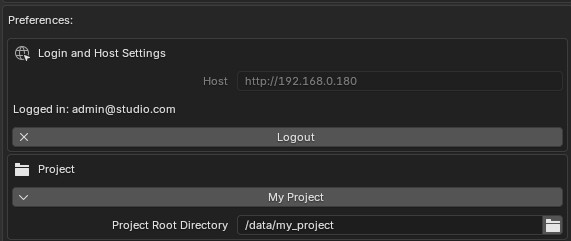
- Login
- Host:
{my_kitsu_server_url}Set during Kitsu Server Setup - Username:
{username@studio.org} - Password:
{user_password}
- Host:
- Project Settings
- Select Production: Choose the current production.
- Project Root Directory:
data/your_project_name
- Login
The following settings will be set automatically if they exist. You can set a custom path by entering them manually, or leave them blank to set them automatically.
- Animation Tools
- Sequence Playblasts:
data/your_project_name/shared/editorial/footage/pre/ - Shot Playblasts:
data/your_project_name/shared/editorial/footage/pro/ - Frames Directory:
data/your_project_name/shared/editorial/footage/post/
- Sequence Playblasts:
- Editorial
- Export Directory:
data/your_project_name/shared/editorial/export/
- Export Directory:
- Render Review
- Farm Output Directory:
data/your_project_name/render/
- Farm Output Directory:
- Advanced
- Use Version Control (bool): Indicates if SVN or GIT-LFS is being used for version control. If disabled, local backups of production files will be created when publishing to Kitsu.