Creating Your First Asset
The next step is to create an asset and store that information on the Kitsu Server. If you are using the Asset Pipeline Add-On, see the Asset Pipeline Guide.
- If you haven't already, ensure your project settings are set up: Blender Kitsu Add-On Preferences.
- Follow the Kitsu New Asset Guide to create your asset on the Kitsu Server.
- Navigate to
Project > New Assetin the header orFile > New > Asset Fileto create a new asset file.

- Select an Asset Type and Asset in the Operator Pop-Up. Your asset file will open.

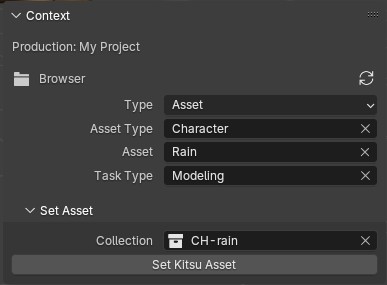
- Under the Kitsu > Context > Set Asset sub-panel:
- Collection is set to the asset's parent collection.
- Run the Set Kitsu Asset operator to send the current filepath and selected collection to the Kitsu Server.
- You should now see the filepath and collection under the asset's metadata on Kitsu.

- Your new Asset file will be saved to
your_project_name/svn/pro/assets/{asset_type}/{asset_name}/{asset_name}.blend.